
Pricing
Add-ons
Extras shoppers choose or type next to the size, like lamination, grommets or lettering.
Add-ons are extras shoppers choose next to the size, such as lamination, grommets, hemming, rounded corners or rush, or words they type, such as a name on a plaque. On the editor's Options tab, in the Add-ons section, click Add add-on.
Types
Choose a Type. It can't be changed later, because rules may use it.
- Choose one
- A list of choices, each with its own price, such as Lamination: None, Gloss, Matte. Set a Default choice if you want one selected; it must be a choice that adds nothing to the price. A choice can set its own Days to make, such as Rush: 1 day.
- Yes / no
- A checkbox. Ticked by default only when it adds nothing to the price.
- Number
- A count with a Minimum, Maximum and Default (with a price, 0 or empty; or the minimum when it's required), and a Price per unit, such as Grommets at $0.50 each.
- Text
- Words the shopper types, such as the lettering on a sign or a name to engrave. Free, a flat price, or a price per character. See Text add-ons.
Shoppers choose anything that costs extra themselves, so a default can't add to the price. If an extra is part of every order, put it in the base price or the material's rate instead.
Prices
| Price | Charged as | Example |
|---|---|---|
| No extra cost | Nothing | A colour choice |
| Flat ($) | A fixed amount per item | Rush fee $25 |
| Per area ($) | Amount × width × height (not on a product priced by length) | Lamination $0.50 / sq ft |
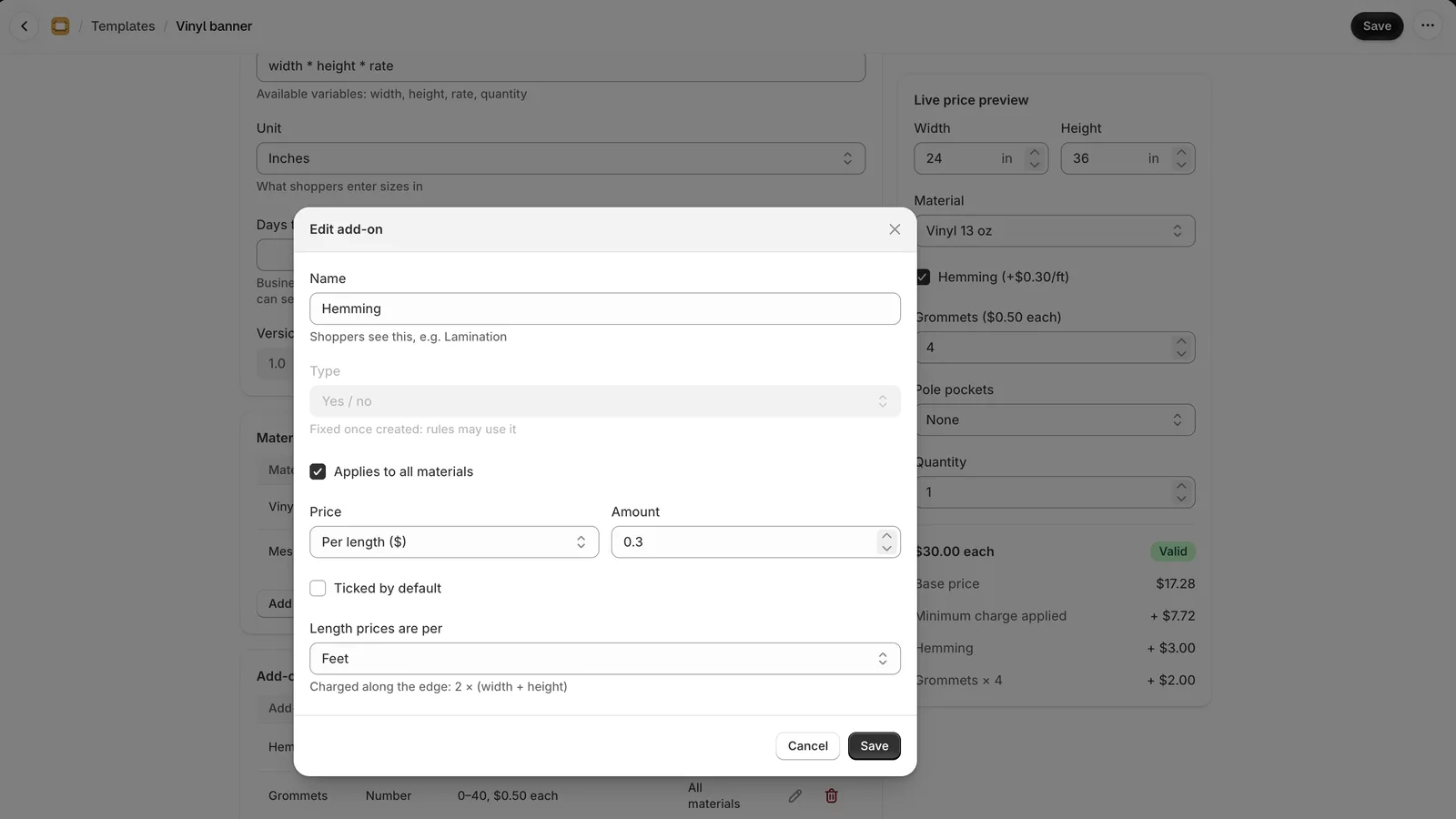
| Per length ($) | Amount × the edge, 2 × (width + height), or × the length on a product priced by length | Hemming $0.30 / ft; a cover $4 / ft |
| Percent (%) | A percentage of the price so far, from −99% to +1000% | Double-sided +60% |
| Per character ($) | Amount × the characters typed (Text add-ons only) | Lettering $0.50 a letter |
When a price is per area or per length, choose its unit under Area prices are per or Length prices are per.
Text add-ons
A Text add-on is a box the shopper types into. In its dialog:
- Placeholder
- Shown in the empty box, such as "e.g. Dr Jane Smith".
- Shortest and Longest
- In characters, up to 200. Left empty, there's no shortest and the longest is 200. With a longest, the box counts the characters as the shopper types.
- Characters allowed
- Any, except emoji, or Letters, digits, spaces and . , ' & - # / for a cutter or engraver that can't do more. Letters with accents and in other alphabets count as letters. Emoji are never taken.
- Several lines
- A taller box that takes line breaks, for an address or a two-line sign.
- Spaces count as characters
- For a price per character: unticked, "Dr Jane Smith" is 11 characters; ticked, 13. Line breaks never count.
A product can have up to 3 Text add-ons. The shortest and longest count every character, spaces and line breaks included; only the price leaves spaces out unless you tick the box. Spaces at either end and invisible control characters are removed before the text is counted, priced and saved.
Your base formula, a rule's condition and amount, and validations read the text's character count as its key followed by _chars, counted as the price counts it; the dialog shows the name to use, such as main_line_chars. So max(0, main_line_chars - 30) * 0.25 adds $0.25 for each letter over 30. In the rule builder, the count is a field of its own, such as Main line: characters; the text itself isn't offered there, since a rule compares numbers and choices.
The text goes on the cart line and the order as "Main line: Dr Jane Smith", and the production queue, job tickets, the CSV and quotes show it exactly as typed. Checkout counts and prices it again, and refuses text that is too long or uses characters the add-on doesn't allow.
When an add-on shows
- Required: shoppers must choose or enter something. Not offered for Yes / no.
- Applies to all materials: untick it to offer the add-on only with some materials. It's hidden for the others.
- Show only when: Always, or only while All of these hold or Any of these holds, with up to 5 tests (below).
Show only when
Each test looks at the material, a size, or an add-on above this one:
| Field | Tests | Example |
|---|---|---|
| Material, or a Choose-one add-on | is one of, isn't any of | Material is one of Planar |
| Width, height or length | is at least, is at most, is from … to | Width is at least 3000 |
| A Number add-on | is at least, is at most, is from … to | Grommets is at least 1 |
| A Yes / no add-on | is ticked, isn't ticked | Pass door is ticked |
| A Text add-on | is filled in, is empty | Second line is filled in |
Sizes are tested as the shopper typed them, in the product's unit, and "at least" and "at most" include the number itself. With All of these hold, every test must hold; with Any of these holds, one is enough. For example, show Colour when Material is one of Planar and Motif is one of M.
A test on an add-on that isn't showing never holds, not even "isn't any of", so add-ons can follow each other in a chain: when Operation isn't Electric, Motor is hidden, and so is Extra remote, which shows only when Motor is ticked. A test on a Choose-one add-on with nothing chosen yet doesn't hold either; an unticked box counts as "isn't ticked", and an empty text box as "is empty". The dialog warns when a test can never hold.
A hidden add-on is never charged: checkout applies the same tests to every line.
On the product page
Shoppers see the price with each option, such as "Gloss (+$12)", "Rounded corners (+$5)", "Grommets ($0.50 each)" or "Main line (+$0.50 per character)". Required add-ons are marked with *. The chosen add-ons show on the cart line and the order, such as "Lamination: Gloss", in the shopper's language when you translate your words.
A Choose-one add-on can show its choices as tiles, cards or swatches instead of a dropdown: choose Show choices as in its dialog. Each choice can then have an image.