
Production Pro
Production queue
What to make next, with due dates, stages and material totals.
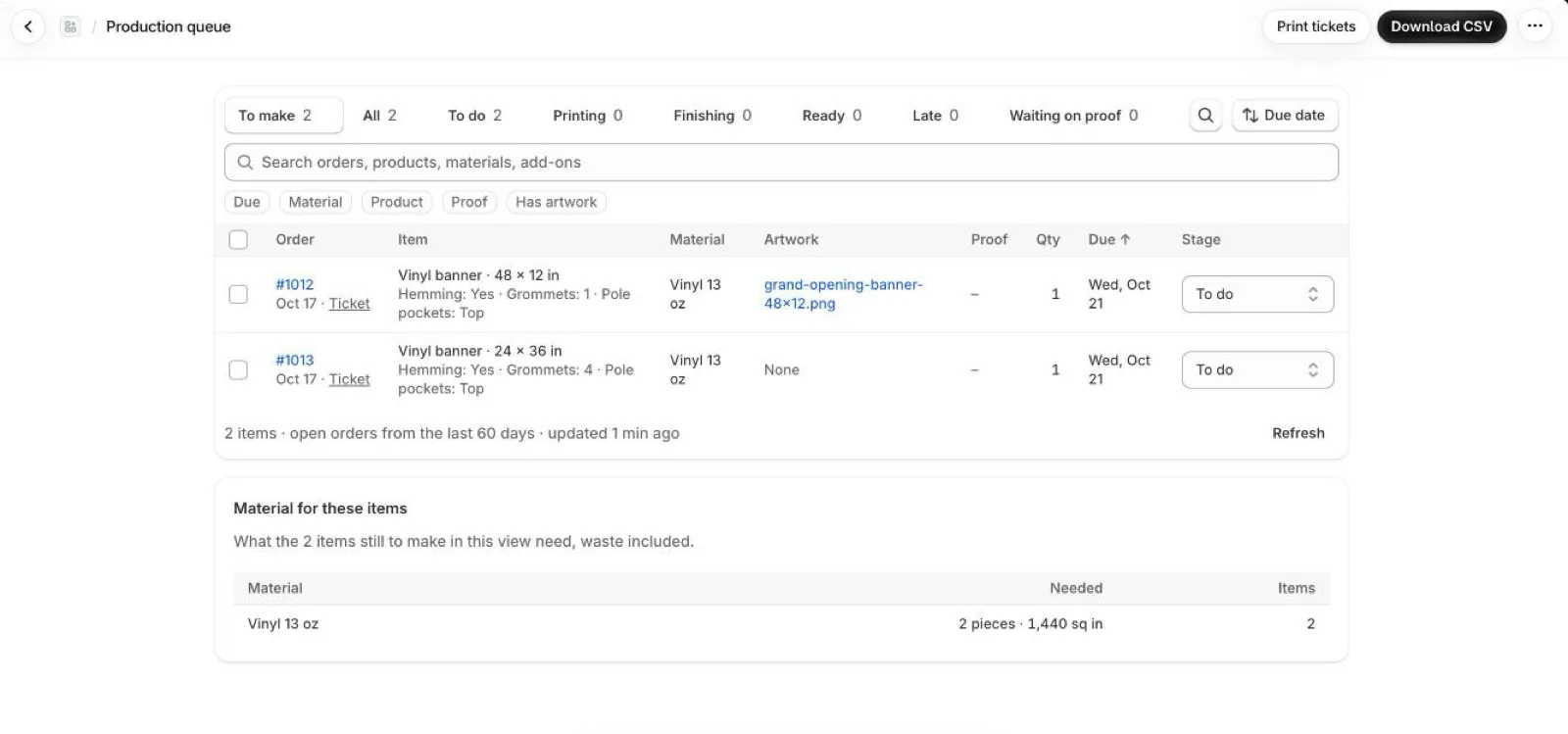
Production lists what to make: the configured items on your open orders from the last 60 days. An item leaves the queue when you fulfill it in Shopify.
The production queue and material totals are on the Pro plan. Try it free for 14 days.
Order access
The first time, click Grant access to let Trimsize read orders. It reads items, sizes, materials and the options shoppers chose, not customer names, addresses, emails or phone numbers, and it doesn't store orders.
What each line shows
The order (with a link to its ticket), date, product, size, material, add-ons, artwork, proof status, quantity to make, due date and stage.
Tabs, search, filters and sort
The queue opens on To make: every item that isn't Ready yet, late ones first, then by due date. The other tabs are All, To do, Printing, Finishing, Ready, Late and Waiting on proof, each with its count.
Search by order number (with or without the #), product, material or add-on. Use the filters for due date, material, product, proof status and whether the shopper uploaded artwork; Clear all removes them. Sort by due date, order date or order number. The view is in the page's address, so you can bookmark it or send it to someone. The queue shows 50 items a page.
Stages
Every line starts at To do. Move it through Printing, Finishing and Ready with its select, or tick several lines and choose Move to stage… to move them together. Stages are saved on the order, so the first change asks permission to update orders.
Ticked lines stay ticked as you page through a view, and are cleared when you change the tab, search or filters. If some lines can't be moved they stay ticked so you can try again.
Print job tickets
Tick lines and click Print tickets to print their tickets, one order per sheet. With nothing ticked, the Print tickets button at the top prints the orders in the current view. Up to 25 orders print at a time; if there are more, the page says so.
Due dates
The product's Days to make, in business days (Monday to Friday) after the order date. A chosen add-on with its own days wins; with several, the longest. Lines past their due date that aren't Ready are marked Late and show how many days late they are.
Due dates use the product's current Days to make, and don't skip holidays.
Material for these items
Below the table, Material for these items shows how much of each material the items in your current view still need: pieces, area, area with waste, and sheets if you've set a sheet size. The totals follow the tab, search and filters, so you can work out the material for one product or one week. Lines marked Ready aren't counted.
Download CSV
Exports the items on your open orders from the last 60 days (up to 200 orders), whatever tab, search or filters the page shows: order, date, product, size, material, add-ons, quantity, artwork, due date and stage, with the material totals of the items not yet Ready. Use it for the shop floor or a spreadsheet.